Tap into the power of Gemini in Chrome on Android.
Google has expanded access to its Gemini in Chrome assistant to all Android users in the U.S., offering features like article summarization, web-based queries, and integration with Google apps such as Calendar and Keep.
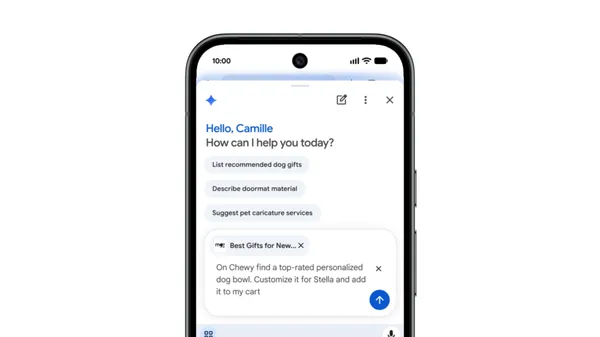
Google announced that its Gemini in Chrome assistant is now available to all Android users in the U.S., enabling users to summarize lengthy articles, answer questions about web content, and interact with Google apps like Calendar and Keep without switching between tabs. The tool also supports image generation and customization using Nano Banana. Users can access these features by tapping the Gemini icon or the three-dot menu in the browser’s top bar on Android devices.
AI Pro and AI Ultra subscribers on Android in the U.S. can now use Gemini in Chrome’s agentic capabilities, including an auto-browse feature designed to automate routine tasks such as booking parking, updating recurring orders, or organizing travel plans. The auto-browse function is intended to reduce manual effort by handling repetitive actions directly within the browser. Google states that these features are built with security in mind, incorporating measures to detect known threats like prompt injection.
For sensitive tasks, the auto-browse feature is designed to request user confirmation before proceeding, providing an additional layer of control. Google emphasizes that the models powering these features are trained to identify and mitigate potential security risks. The company highlights that the implementation prioritizes user safety and transparency in automated actions.
The expansion follows Google’s broader effort to integrate AI-driven assistance into its Chrome browser on Android, aiming to streamline web browsing and productivity. The features are available to users in the U.S. at no additional cost beyond existing subscription tiers for AI Pro and AI Ultra users.